Operating principle
ADS Save System clearly separates save-operation orchestration from your game’s own data. The ADS Save Subsystem coordinates the operation; your game objects remain responsible for their data.
Responsibilities
The ADS Save Subsystem
The subsystem is the system’s central point. It receives a save or load request, prepares the Save Game Object, manages the slot, opens the required level when needed, and controls the operation order. It also knows when the operation can finish, but it does not know the structure of your game data.
It therefore delegates the actual save and load work to participants, then waits for their responses before continuing. Only one operation is processed at a time, preventing incomplete data from being written or applied.
Participants
A participant is a game object that owns a portion of the state to retain. It can be the player character, an inventory manager, a quest, a progression system, or an important actor in the level.
Each participant registers itself with the subsystem and subscribes on its BeginPlay to the On Save Requested and On Load Requested dispatchers. It remains the owner of its data: the subsystem does not decide which variables to save or how to restore them.
The Save Game Object
The Save Game Object is the shared container that moves through the operation. Participants write their data into it when saving and read their data from it when loading. It also holds the information managed by the system, such as the slot, associated level, version, and—when enabled—the thumbnail.
How saving works
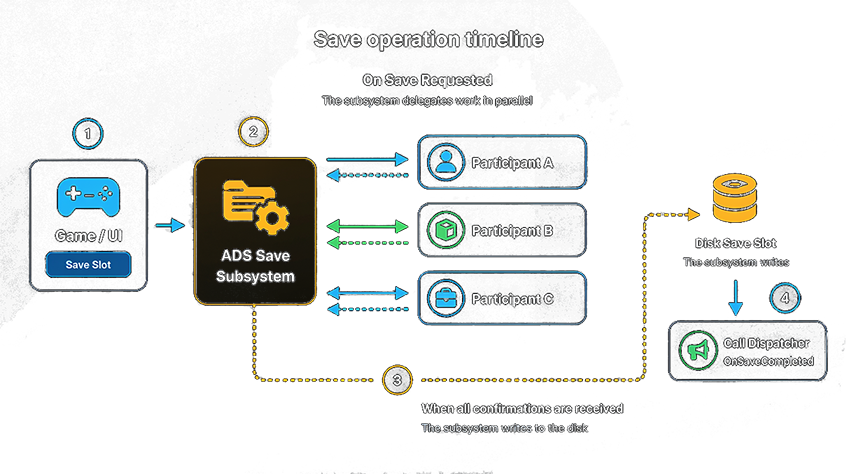
- Your UI or game logic requests a save from the subsystem with Save Slot.
- The subsystem prepares the Save Game Object, then broadcasts On Save Requested.
- Each registered participant gathers its own data, writes it into the Save Game Object, then confirms completion with Set Part Saved.
- Once every expected participant has successfully responded, the subsystem writes the Save Game Object to the selected slot and broadcasts On Save Completed.
A participant that does not respond, reports failure, or times out intentionally prevents the final write: the system cancels the operation rather than creating a partial save.
How loading works
- Your UI or game logic requests a load from the subsystem with Load Slot.
- The subsystem reads the Save Game Object from the slot. If the save belongs to another level, it first opens the saved level.
- Once the level is ready, the subsystem broadcasts On Load Requested.
- Each registered participant reads its own part from the Save Game Object, applies its data, then confirms completion with Set Part Loaded.
- Once every expected participant has successfully responded, the subsystem broadcasts On Load Completed.
What your project configures
Your project decides which objects become participants and which data each one manages. It also triggers saves and loads from its UI or game logic. The subsystem centralizes the operation lifecycle, participant coordination, slots, level transitions, and completion notifications.
Manual saves are chosen by the player. Automatic saves rotate through several slots. A separate profile notably stores the last known save. Finally, if a save uses an older data version, the project save behavior can convert it before loading.