Detailed use
ADS Audio Subsystem
Access
In a Blueprint, use the Get ADS_AudioSubsystem function.
Functions
| Name | Description |
|---|---|
Ensure Audio Components | Creates the persistent audio components used by the system if they do not already exist. This function is called automatically by playback functions: you normally do not need to call it. |
Create Persistent Audio Component | Creates a persistent 2D audio component. This function is used automatically by the system: you normally do not need to call it. Without a sound, the system uses Cue_Empty. |
Play Music | Starts music. You can provide a locale, fade-out and fade-in durations, volume, pitch, and request a music lock or unlock. Returns true when the active music changes. |
Stop Music | Stops the currently active music. |
Pause Music | Pauses or resumes the active music according to the supplied value. |
Adjust Music Volume | Changes the active music volume over a given duration, using the selected fade curve. |
Set Music Locked | Locks or unlocks music changes at runtime. |
Is Music Locked | Returns whether music changes are currently locked. |
Get Music Component | Returns the active or inactive music component and its index in the system. |
Get Active Music Component | Returns the component playing the active music. |
Play Sound | Plays a persistent 2D sound. You can provide a locale, component index, volume, and pitch. Different indexes let you play several sounds independently. |
Set Localized Sound Table | Sets the localization Data Table to use for music and sounds. |
Get Localized Sound Table | Returns the currently assigned localization table; if none is assigned, the system uses DT_LocalizedSound. |
Resolve Localized Sound | Returns the sound variant matching the requested locale. If no variant is found, it returns the source sound. |
Dispatchers
| Name | Description |
|---|---|
On Music Changed | Fires when active music changes. It provides the previous music and the new music. |
On Music Lock Changed | Fires when the music lock state changes. It provides the new lock state. |
Localized audio
To use a localized version of a sound or music track, open the DT_LocalizedSound Data Table provided by the plugin.
- Add a row to the table.
- In
Source Sound, set the reference sound that you will pass toPlay MusicorPlay Sound. - In
Localized Sounds, add one entry for each language. The key is an IETF language tag, for examplefr-FR; the value is the sound to play for that language. - When calling
Play MusicorPlay Sound, pass the reference sound and the same code inLocale To Play.
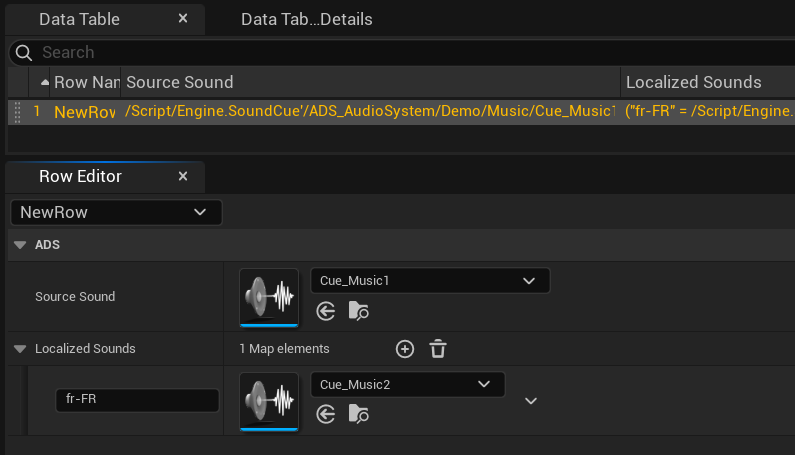
If no variant matches the supplied code, the system plays the reference sound.
AC ADS Audio Parameters
Attach the component
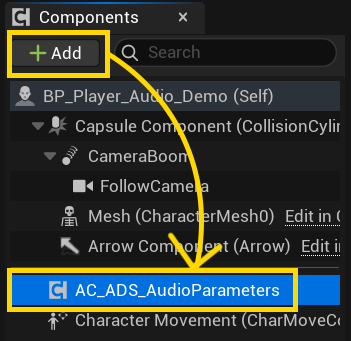
Add AC ADS Audio Parameters to the Player from the Components panel. At BeginPlay, it can automatically start the music associated with the current level and apply the assigned Sound Mix.
Parameters
| Name | Description |
|---|---|
Assign Music Level | Associates a level name with music. If the current level has an entry, that music starts automatically at startup. |
Sound Mix | Defines the base Sound Mix to apply at startup. Leave this parameter empty when no Sound Mix should be applied. |